Beginner's Guide: Your First Battle
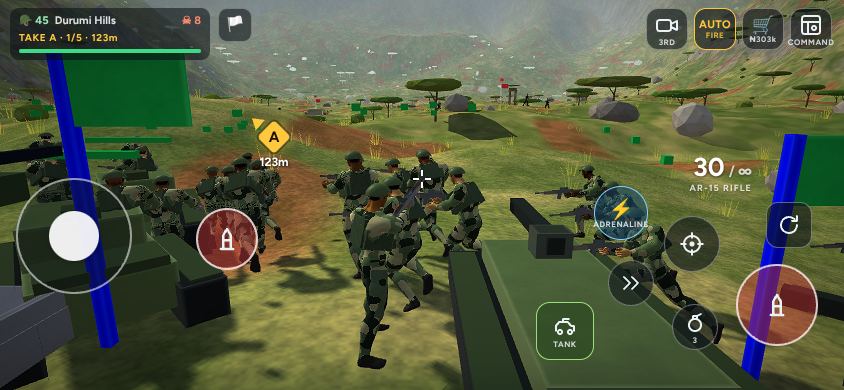
Abuja World: Frontline drops you into a war for the Federal Capital Territory with ten riflemen, two crewed tanks and a War Chest. This guide walks you through your first battle step by step, then explains how to turn one win into a campaign that takes back the city, from Kubwa and Wuse all the way to the final Battle for Samiza.
1. Join the Frontline
Open abuja.world/play on a phone, tablet or computer. There is nothing to download. Pick a callsign of 3 to 15 letters, numbers or underscores, choose your soldier's skin tone and colour, and tap Enlist. You do not need an email address: the game creates a guest account straight away. If you later want to keep your progress when you change phones, tap Save progress on the main menu and link a Google account.
Turn your phone sideways. Battles are played in landscape, and on iPhones the game rotates the screen for you if you hold the phone upright.
2. Start the campaign
On the main menu, tap Start the campaign. The first time you do this the game hands you your starting army (ten riflemen) and your War Chest, then sends you straight into battle for a district next to your home ground of Jabi: Kubwa, Wuse or Garki. There is no separate tutorial level: the first battle is the tutorial, and the enemy there is the weakest you will meet.
The opening message tells you three things: the district you are fighting for, the kind of ground (for example "shelled outskirts"), and the weather and hour, such as "misty dawn". Every battle is different, so read it.
3. Learn the four controls
- Move with the joystick on the left. A light push walks, further out runs, and all the way out sprints.
- Aim by dragging anywhere on the screen. Drag sideways to turn, up and down to raise or lower your rifle. Your soldier stays where he is while you aim.
- Fire with the big red button, or leave AUTO fire switched on: your rifle fires by itself whenever the crosshair turns red over an enemy.
- Aim down sights with the target button for tighter, longer shots.
The controls and aiming guide covers every button and the aim settings in detail.
4. Read the battlefield
Each battle is split into five sectors, A to E, one behind the other. The panel at the top left shows your army size, the district, the sector you are attacking and the enemies still holding it. A yellow diamond marks your current objective with its distance in metres.
You win a sector by clearing out its defenders. When a sector falls, the enemy's next line becomes the target, your reinforcements move up, and a new safe zone appears behind you where wounded soldiers heal. Take all five sectors and the district is yours.
5. Let your army work
Your soldiers are not a crowd that charges forward. They advance from cover to cover, crouch behind rocks and sandbags, lean out to shoot and duck back when shot at. The two sides hold a front line about 40 to 60 metres apart, and the stronger side presses forward. Stay with your squads: if you run ahead alone, the enemy will focus on you.
Three simple habits win most early battles:
- Stay behind cover when you reload. A reload takes over a second and a half with the rifle.
- Shoot the closest enemy first. He is the one most likely to hit you.
- Fall back to heal. Standing in the safe zone with no enemy nearby restores your health.
6. Don't go down five times
If you are knocked out, you return at the safe zone a few seconds later. The panel counts how many times you have gone down in the battle. On the fifth time, the enemy counterattacks and takes back the last sector you captured. It is a warning, not a game over, but it costs you ground, so play carefully once the counter reaches three.
7. Spend your War Funds
Every kill, every broken enemy line and every freed hostage pays War Funds. Tap the shop button during a battle to call in reinforcements when soldiers fall. You can field up to 30 soldiers and two tanks at a time. Between battles, visit the War Room to train soldiers and upgrade your barracks, which unlocks grenadiers, medics, snipers and armour. The War Funds and army guide explains the costs.
8. Do the side missions
Two hostages are held behind every enemy line, and in the Battle for each district a commander leads the defence of sector C. Freeing hostages and capturing the commander alive pay well and make battles more interesting. See the side missions guide.
9. Keep the campaign rolling
When you win, the game moves straight on to the next district after a short break. You can stop at any time with the white flag button: the positions you took stay yours for the next attack. Three new Daily Orders appear on the main menu every day, each paying a bonus for things like landing headshots or destroying tanks.
Quick checklist for your first battle
- Landscape, sound on if you want it (the speaker button), AUTO fire on.
- Follow your squads toward the yellow objective marker.
- Fight from cover, reload behind cover, heal at the safe zone.
- Free the two hostages behind sector A on your way through.
- Buy replacements in the shop as soldiers fall.