Controls and Aiming: How to Shoot Well
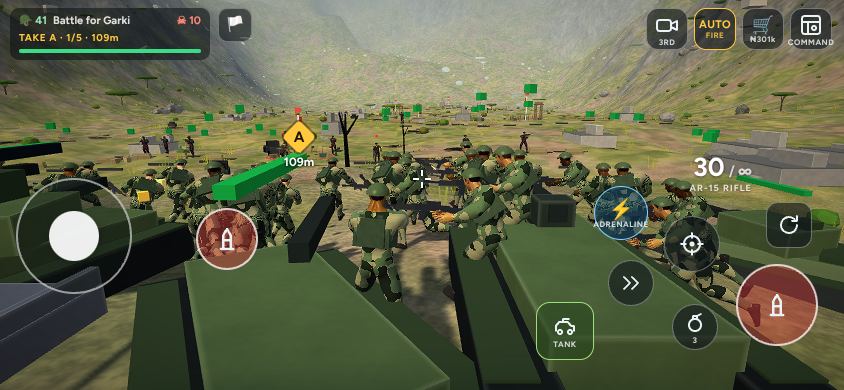
Good aiming wins more battles than anything else in Abuja World: Frontline. This guide explains every control, how the game decides whether a shot hits, and the settings that make aiming feel right on your phone.
The battle screen
| Control | Where | What it does |
|---|---|---|
| Joystick | Left side | Move. Light push walks, further runs, all the way out sprints. |
| Drag anywhere | Any empty part of the screen | Turn left and right, look up and down. Your soldier does not move while you aim. |
| Fire | Big red button, bottom right | Hold to shoot. You can also drag on the fire button to aim while firing. |
| Aim down sights | Target button | Zooms in. Steadier shots, longer reach, slower movement. Snipers get a full scope. |
| Reload | Circular arrow | Reload early, behind cover, before the magazine runs dry. |
| Grenade | Grenade button | Throws a grenade where you aim. Three per battle. |
| Dash | Double-arrow button | A quick dodge to get out of fire or into cover. |
| Ability | Round blue button | Your operator's special ability (see the operators guide). |
| AUTO / 3RD / shop / COMMAND | Top right | Auto fire on or off, camera view, battlefield shop, Command view. |
How aiming works
The crosshair sits in the middle of the screen. In third person the camera sits behind your soldier's shoulder. Dragging sideways turns you; dragging up and down tilts your view, about 35 degrees up and 45 degrees down, and your soldier's chest and rifle bend to follow. Slow drags are precise, quick swipes turn fast.
A shot is checked in three dimensions. If the crosshair passes over a soldier's head or under his feet, the shot misses. A shot near the head counts as a headshot and does double damage. Enemies crouched behind cover are smaller targets, and most of a shot that hits their cover is absorbed by it.
Tap to aim
Tap an enemy on the screen and your rifle swings straight onto him. This is the fastest way to switch targets on a phone.
Aim assist
While you fire or aim down sights, a gentle aim assist pulls the crosshair onto the nearest enemy's chest, sideways and up or down. It never pulls against you: for a moment after you drag, it lets go completely.
Auto fire
With AUTO on, your rifle fires by itself whenever the crosshair turns red over a visible enemy. It is the easiest way to play on a phone, because your thumb stays free to aim. Switch it off with the AUTO button if you prefer to choose every shot.
Recoil, spread and range
Each shot kicks the rifle up a little, and firing continuously widens your spread. The crosshair shows this: its arms open out as you fire and close again when you stop. Short bursts of three to five rounds keep shots tight. Moving, and especially sprinting, makes long shots miss more. Aiming down sights halves the spread and nearly doubles your reach.
Each weapon has its own range: about 100 metres for the assault rifle, 170 metres for the sniper rifle, and much less for the SMG and shotgun. The weapons guide lists them all.
Aim speed
Open Operator on the main menu and scroll to Aim speed. Choose Slow for precise long-range shots, Normal for most players, or Fast if you want quick turns with small swipes. The setting is saved on your phone.
Camera views
- Third person (3RD): the default. Over the shoulder, good awareness of what is around you.
- First person (1ST): through your soldier's eyes, with your rifle and gloves in view. Best for precise shooting.
- Command: a view from above where you give orders to your squads (see the squad tactics guide).
Moving well
Your soldier moves with some weight: he takes a moment to get up to speed and to stop. Walking backwards is slower than walking forwards, strafing sideways is a little slower, and moving while aiming down sights is slowest of all. Use the dash to break line of sight quickly.
Tips
- Keep the crosshair at chest height on the enemy line as you advance. You will need to move it less when someone appears.
- Aim at heads on enemies that are standing still or crouched: two headshots kill.
- Use the sniper rifle only when your army is holding a line; it is slow to fire and weak up close.
- If aiming feels too fast or too slow, change Aim speed before changing anything else.